![logo.png]](https://help.teamsense.com/hs-fs/hubfs/logo.png?height=40&name=logo.png)
What do the percentages on the Attendance Insights page mean?
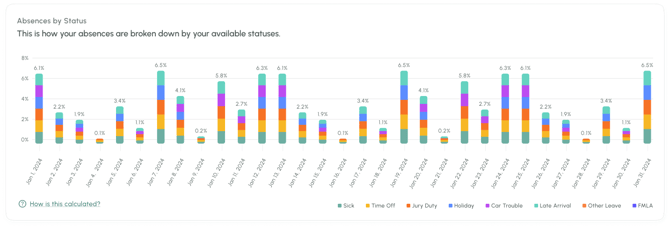
The percentages shown on Attendance Insights are TeamSense's absence rate, and are calculated as follows:
(sum of absent days) / (sum of daily headcount)
where
- ‘Sum of absent days’ is the total days of absences in a given time period
- ‘Sum of daily headcount’ is the total workforce headcount each day summed across the given time period. This is often simplified as:
(average # of employees in time period) * (count of days in time period)
For example: If your organization had 1,000 one-day absences in the month of March and over the month of March you had an average headcount of 2,000 employees, we would calculate your absence rate as:
(1,000 absences in March) / (2,000 employees per day * 30 days in March) = 0.0167 = 1.7%
Note that this calculation is slightly different from a traditional absenteeism calculation, which only counts scheduled employee workdays in a period (rather than all days). The traditional definition for absenteeism rate is as follows:
(sum of absent days) / (sum of available workdays)
where
- ‘Sum of absent days’ is the total days of absences in a given time period
- ‘Sum of available workdays’ is the total number of scheduled workdays during the time period summed across all employees
For example: If your organization had 1,000 absent days in the month of March and over the month of March you had an average headcount of 2,000 employees, and each employee was scheduled to work 21 days in the month of March, your traditional absenteeism rate would be:
(1,000 absent days) / (~2k employees * 21 days in March) = 0.0238 = 2.4% absenteeism rate
In general, you can expect TeamSense's absence rate to be lower than a traditional absenteeism rate, since TeamSense will typically have more employee-days in its denominator than a traditional absenteeism calculation.
How should I interpret my data in Attendance Insights?
Interpreting data is both an art and a science, and should always be done with thoughtfulness and care. Here are some factors to keep in mind when interpreting your TeamSense Insights data:
- Absence rate: The absence rate calculation relies on the accuracy of the number of employees in your organization's TeamSense account. If that data is fluctuating for any reason, it can skew your absence rate.
For example, consider an organization with 3,000 employees in TeamSense that adds another site with 1,000 employees into TeamSense, but doesn't roll it out to the new site for another month. In that case, the 1,000 employees from the new site are in TeamSense, but their absences are not, causing the absence rate to temporarily decline. - Employees with the Most Absences: For an employee to be included on the list of Employees with the Most Absences, they must currently be active. There are times when employees may be inadvertently inactive in TeamSense records, particularly where data syncs play a role in managing employee state. We encourage organizations to be thoughtful in case such factors cause an employee to be missing from the report of Employees with the Most Absences.
Does the absence rate calculation include all absences - including partial absences and absences scheduled in advance?
If you would like to remove partial absences or scheduled absences from your Insights metrics, you can use the Filters in the top right corner of the page to select only the pertinent employee statuses.